
For a fast action game like Phantom Blade Zero, frame rate shapes the experience as much as image quality. A sharper image can make scenery and character detail easier to appreciate, but responsive controls matter when fights ask you to react quickly. The PS5’s graphics modes make that tradeoff clear: Performance targets 60 FPS, Quality delivers native 4K at 30 FPS, and PS5 Pro adds a 40 FPS Balanced option for players with the right display.
Those figures describe different priorities, rather than a single setting that’s best for everyone. Resolution affects how clean the image looks; frame rate affects how frequently the screen updates and can influence the feel of movement. The difference is most apparent when you’re switching between modes or paying close attention to combat. Here’s the thing: a mode’s headline resolution won’t tell you by itself whether it’s the better choice for the way you play.
Balanced is the PS5 Pro sweet spot

On PS5 Pro, Balanced is my pick for a full playthrough. It renders an upscaled, checkerboarded 4K image at 40 FPS, provided you’re using a 120Hz TV with VRR. The image comes close to native 4K, while the higher frame rate makes combat feel noticeably smoother than at 30 FPS. That combination gives the mode a useful middle ground: it preserves much of the sharpness people want from a 4K display while moving beyond the 30 FPS ceiling of Quality.
The display requirement matters. Balanced is designed for a particular setup, so owning a PS5 Pro alone doesn’t guarantee that you’ll get the intended result. If you’re deciding which mode to use, check that your screen supports both 120Hz and VRR before treating Balanced as an option. A setting that looks appealing on paper can’t deliver its intended experience if the display doesn’t support the features it relies on.
There’s a catch: Balanced is exclusive to PS5 Pro. If you’re playing on a standard PS5, your choice comes down to prioritizing smoothness or resolution. That makes the choice clearer, even if it leaves players without the same middle option. No single setting can erase the hardware difference.
Choose the mode that fits your play style
Performance mode runs at an upscaled 2K resolution and holds close to 60 FPS. That extra responsiveness suits the game’s rapid, fluid fights. The image is less crisp than in the other modes, but the difference may be hard to spot during normal play unless you’re comparing them side by side. In practice, the tradeoff is between the greater image detail available elsewhere and a higher frame rate that keeps action feeling nimble.
That distinction can matter more during a fight than while standing still and inspecting a scene. If you’re mainly interested in reacting to enemies and following fast movement, Performance makes a strong case for itself. If you tend to notice fine image detail first, the resolution drop may bother you more. Your screen size, viewing distance, and own sensitivity to motion can all affect which compromise feels acceptable, so the stated resolution isn’t a complete guide to what you’ll prefer.
Quality mode delivers native 4K, the sharpest image available, at 30 FPS. That looks excellent while exploring Wulin or taking screenshots. For combat, though, the lower frame rate makes this the least appealing option of the three. Its appeal is easy to understand: it gives visual detail priority. The question is whether that benefit matters enough to you during the parts of the game that demand quick reactions.
The practical choice is straightforward: use Performance for 60 FPS action, Balanced on PS5 Pro for a middle ground, or Quality when visual detail matters more than responsiveness. You can also treat the modes as a preference test rather than a permanent commitment. Try a fight and an exploration section in the mode you’re considering; the difference you notice during actual play is more useful than the resolution label alone.
A quick reference: Quality favors native resolution, Balanced splits the difference on PS5 Pro, and Performance prioritizes frame rate. The numbers are simple; the preference isn’t. If you’re working out which setting fits your setup, start with the mode that matches your display and then decide whether clarity or motion feels more important.
- Quality Mode: Native 4K resolution at 30 FPS
- Balanced Mode: Upscaled 4K resolution at 40 FPS
- Performance Mode: Upscaled 2K resolution at 60 FPS
Ray tracing and PC requirements
On PS5 Pro, ray tracing can be enabled in any of the three modes. Testing with the feature on and off showed no noticeable performance changes or issues, so there’s little reason to leave it disabled. That’s a useful finding for players who want the feature enabled without making an obvious sacrifice elsewhere, though the reported result describes this testing and doesn’t guarantee that every player will perceive the same thing on every setup.
This is more significant than it looks: graphics features often come with questions about what they cost in return. Here, the reported testing didn’t find a noticeable performance penalty from ray tracing. And yet, that doesn’t make the setting a reason to change modes. Frame rate and resolution remain the main choices described here, while ray tracing can be considered separately on PS5 Pro.
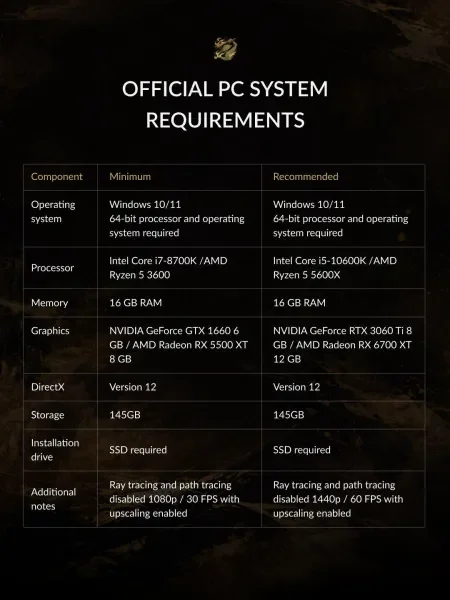
Phantom Blade Zero is also available on PC through Steam and the Epic Games Store. The system requirements are shown below. For PC players, requirements are part of the same practical question as graphics modes: before choosing visual settings, you’ll want to know whether your system meets the game’s listed demands. The information shown here can guide that check, though it doesn’t by itself explain how every combination of hardware and settings will perform.
Console and PC players are making related choices, but the details differ. On PS5, the available modes set out defined targets for resolution and frame rate. On PC, the supplied requirements give players a reference point for their hardware. Neither replaces personal preference: a player who values fluid combat may make different settings choices from someone who mostly wants a sharp image.
What the settings mean for a full playthrough
For most players, the useful decision is less about chasing the highest number and more about choosing which compromise they’ll notice least. Performance targets the highest frame rate on the listed PS5 modes. Quality provides native 4K, but caps the experience at 30 FPS. Balanced offers a midpoint for PS5 Pro owners with a compatible display, and ray tracing can be enabled there without a noticeable change in the reported testing.
That said, the available information doesn’t establish that one mode is universally superior. The frame rate figures and resolution targets explain the tradeoffs, while your own reaction to image sharpness and motion will settle the choice. A single sentence version: pick your priority, then play. For more on the game, read Game Informer's Phantom Blade Zero review, browse tips for new players, or see what it takes to reach the best ending.